
tcnf (Tiny Command Not Found)
lightweight CLI utility that searches your system’s $PATH for executable matches when a command is misspelled or partially remembered.
Features
- Fast & Low Overhead: Written in pure C with minimal dependencies.
- Ranked Results: Matches are scored based on quality (Exact > Prefix > Typo > Subsequence > Substring).
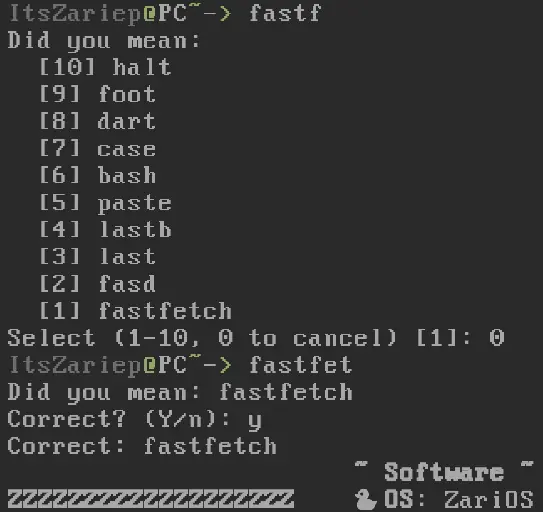
- Interactive Selection: If multiple matches are found, it presents an interactive menu to choose the correct command.
- Complex Matching: Optional “complex” mode for aggressive fuzzy searching (typos and subsequences).
- Highly Configurable: Supports result limiting and output reversal.
Installation
Dependencies
- GNU
make(build-time only)
Building from Source
- Clone the repository:
git clone https://codeberg.org/itszariep/tcnf
cd tcnf
- Build:
make
- Install (defaults to
/usr/local):
sudo make install # or doas
The install target can optionally install shell integration and example configuration files. See Installation Options below.
Usage
You can use tcnf directly as a command:
tcnf <command-name>
Options
| Option | Long Form | Description |
|---|---|---|
-c | --complex | Enable typo tolerance and subsequence matching |
-n <num> | --limit <num> | Limit the number of results (max 100) |
-r | --reverse | Reverse the display order |
-p | --print | Print only, non interactive |
Shell Integration
tcnf can be hooked into your shell so it runs automatically when a command is not found.
Supported shells
- Bash
- Zsh
- Busybox Ash (Partial, arguments not working)
- Fish (Fish crashes)
- Tcsh (No available hook for this)
POSIX shells
(bash, busybox ash, zsh)
Per-user installation (recommended)
Add this line to your shell startup file:
[ -r "$HOME/.config/tcnf/tcnf.sh" ] && . "$HOME/.config/tcnf/tcnf.sh"
~/.bashrc(Bash)~/.profile(Busybox ash)~/.zshrc(Zsh)
System-wide installation
If installed via make install, the integration script may be placed in:
/etc/profile.d/tcnf.sh
In that case, no manual sourcing is required.
Configuration
Configuration is optional but recommended.
tcnf loads configuration files in the following order (later files override earlier ones):
/etc/tcnf.conf~/.config/tcnf.conf- Settings bundled with the shell integration script
Available variables
TCNF_USE_PKGFILE=1      # fallback to pkgfile if no match is found
TCNF_DEFAULT_OPTS="-c -r -n 10"
TCNF_PRINTCORRECT=1    # print the corrected command before execution
Example user config:
# ~/.config/tcnf.conf
TCNF_USE_PKGFILE=1
TCNF_DEFAULT_OPTS="-c -r -n 10"
TCNF_PRINTCORRECT=1
Installation Options (Makefile)
The following variables can be overridden when installing:
| Variable | Description |
|---|---|
INSTALL_SHELL=0 | Disable POSIX shell integration |
INSTALL_FISH=0 | Disable fish integration |
INSTALL_CONF=0 | Do not install example config files |
Example:
sudo make install INSTALL_FISH=0
Scoring Logic
tcnf uses a tiered scoring system to rank matches:
Score = BaseScore + (LengthDifference × 100) + CommandNameLength
Basic matching
- Exact match: case-insensitive equality (score 0)
- Prefix match: command starts with input (score 10 000)
Complex mode (-c)
- Typo match: up to 2 character differences (score 20 000)
- Subsequence match: characters in order, not contiguous (score 30 000)
- Substring match: input occurs anywhere (score 40 000)
Lower scores rank higher.