

NTC
Ncurses Tabbed file Chooser
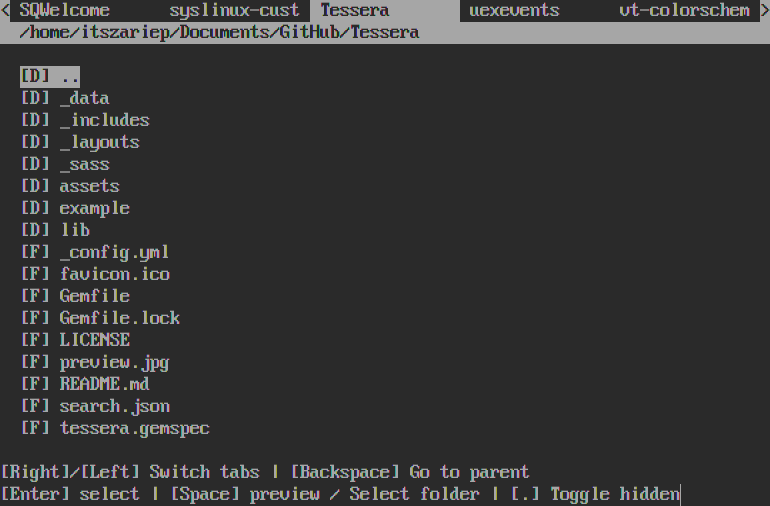
A program that, based on the contents of a folder, creates tabs (subfolders inside the selected folder) and displays their contents.
This program also support passing multiple folders (in that case that folders will be the tabs) and some layout customization options (See below ).

Why
I just wanted a convenient way to send stickers, GIFs, and files in nchat.
Usage
Bindings
| Key | Action |
|---|---|
| Left/Right | Switch tabs |
| Up/Down | move through the list |
| Backspace | Go to parent dir (same as selecting [..]) |
| Enter | Select file |
| Space | Preview file (xdg) or select a folder |
| . | toggle hidden files |
| (Alphanumeric) | Search |
[!NOTE]
Keybinds don’t apply when searching
Program arguments
Usage:
  ntc [OPTION?] [FILES...] [FOLDER(S)]

Ncurses Tabbed file Chooser

Help Options:
  -h, --help                       Show help options

Application Options:
  -p, --printtofile=PATH           Print path into a file
  -e, --extensions=png,txt,...     Set the only extensions will be visible
  -d, --onlydirs                   Only show directories
  -f, --onlyfiles                  Only show files
  -s, --singlepath=PATH            Use a single path/tab
  -r, --restrictbase               Disable going up to parent directories
  -a, --noaddressbar               Hide address bar
  -t, --notabs                     Hide tabs
  -T, --title                      Custom title (replace address bar)
  -A, --titleaddress               Title+Path in address bar
  -S, --swaptabaddress             Tabs and address bar swap positions
  -v, --version                    Show program version

Example usage:
  ntc -r -p output.txt path/to/folder
This will restrict navigation and print the path to 'output.txt'.
Work folder(s) must be always at the end.
If there are 2 or more folders, they will be used as tabs instead.
Nchat example:
- Set ui.conf
file_picker_command=ntc -p %1 -r ~/.FileChooser
~/.FileChooser contains herarchy:
-> tree ~/.FileChooser/
FileChooser/
├── Home -> /home/itszariep/
├── Stickers
│   ├── Random
│   │   ├── Knife.webp
│   │   ├── bn.webp
│   │   └── sadcat.webp
│   └── konqui
│       ├── elegant_konqui.webp
│       ├── katepc.webp
│       └── konqui.webp
└── gifs
    ├── yes.mp4
    └── no.mp4
Build
Dependencies
glibgioncursesw/ncursesset withNCURSESmake flag
git clone https://codeberg.org/ItsZariep/ntc
cd ntc/src
make
If you encounter issues with ncursesw, try building with ncurses instead:
make NCURSES=ncurses
[!WARNING] This may not display names with Unicode characters correctly.